
Summary Answer Block: Traffic can fall even when rankings hold because tracking, click-share, demand, and visibility can move independently. Diagnose the drop in this order: verify measurement, compare clicks vs. impressions, inspect live SERPs for click-share loss, check demand and seasonality, then confirm true visibility loss.
Why rankings still exist, but sessions still fall
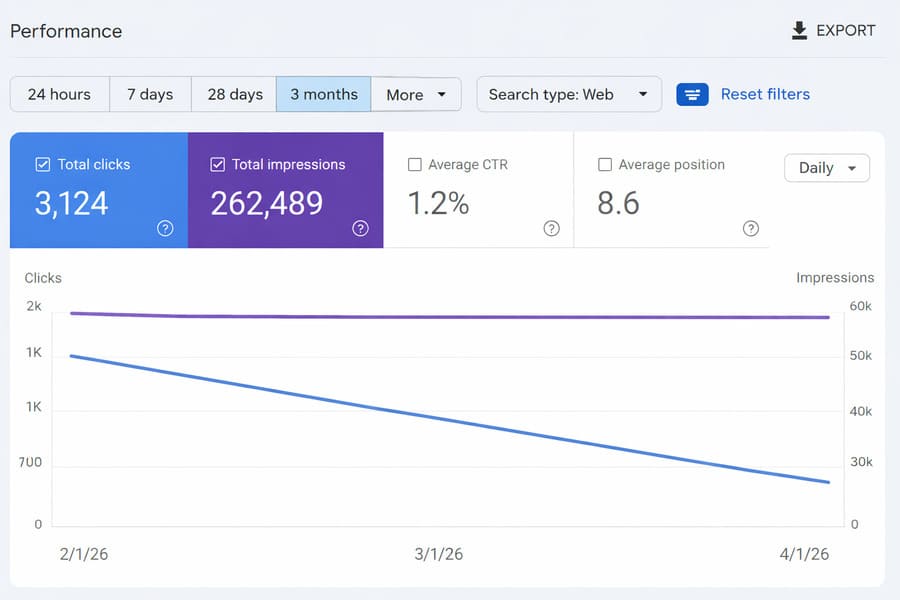
Traffic can drop even when rankings stay stable because clicks, demand, tracking, and visibility don’t always move in sync anymore. The fastest way to spot what changed is to compare impressions, clicks, and position side by side in Search Console.
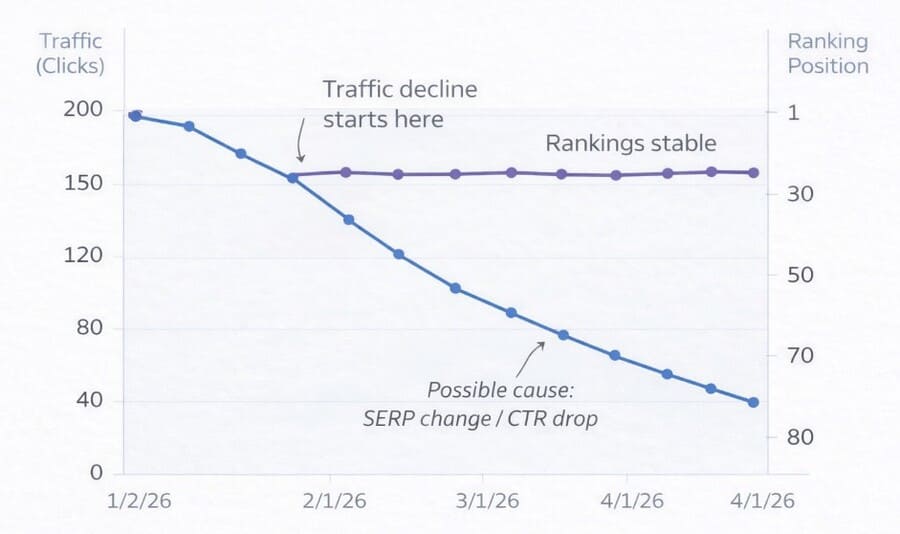
- Clicks down + impressions steady → likely click-share or SERP layout issue
- GA4 users down + server traffic stable → likely tracking-layer failure
- Impressions and average position both down → likely true visibility loss
- Drop concentrated in one geography or device → segmentation clue, not a universal penalty
These patterns are faster diagnostic signals than rank tracking. Impressions-versus-clicks divergence should be one of the first things you check in Search Console, not the last.
If the drop happened suddenly, start with this quick diagnostic: Website Traffic Dropped Overnight: What Should I Check First?
The 4-Bucket Diagnostic Framework
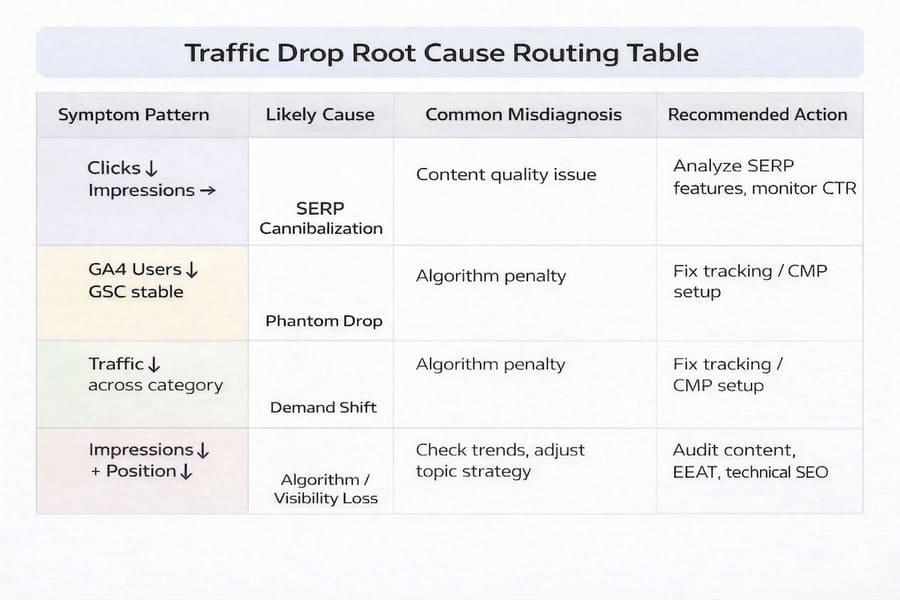
Most traffic drops that happen without ranking loss fall into four buckets: measurement failure, SERP click-share loss, demand shift, or true visibility loss. The point of the framework is to sort the drop into the right bucket before you start fixing the wrong thing.
The 4-Bucket Traffic Drop Diagnostic Framework organises every known cause of a traffic drop into four mutually distinct categories, ordered by how cheap and fast each one is to verify. Start with the cheapest-to-verify cause, not the most emotionally convincing one.
Context and Stakes
If rankings have not moved but traffic is down, the drop is usually happening in one of three other layers: tracking, click-share, or demand. That is why this scenario needs a different diagnosis than a standard ranking-loss investigation.
One of my articles held the number-one position for its target keyword throughout Q4 2025 and still lost 51% of its clicks. Rankings were fine. The page hadn’t changed. No manual actions were filed in Google Search Console. The drop was real, but the cause was not what most diagnostic guides would point to first.
That experience forced a question that most traffic-drop guides still don’t ask cleanly: if rankings haven’t moved, why is traffic gone? The answer is no longer straightforward, and the standard advice, “check your rankings first,” is not wrong. It is simply incomplete for how search works in 2026.
This guide is built for the specific scenario where your position appears intact, but your sessions, users, or organic clicks are measurably lower. That scenario now describes a large and growing share of traffic problems, and diagnosing it correctly determines whether you spend the next four weeks fixing the right thing or the wrong one.
This problem usually affects four groups: site owners who panic-rewrote stable pages, niche publishers hit by SERP layout changes, SEO teams who skipped validation and went straight to competitor analysis, and businesses that blamed AI content when the real issue was tracking. Their shared mistake is acting before they verify which layer actually changed, including assumptions like Google penalising AI content, when the root cause was a consent configuration issue in their analytics layer.
If you want a broader framework for building trustworthy AI-assisted content that aligns with Google’s expectations, refer to the Trusted AI SEO guide, which explains how content quality, trust signals, and human review impact rankings.
Why This Happens Now
One proof point: AI Overviews have significantly reduced clicks to top-ranking pages, even when rankings remain unchanged. That means the old shortcut, treating stable rankings as proof that visibility is intact, breaks down more often than it used to.
Most traffic drops don’t show a single clear signal. Data overlaps. Multiple symptoms appear at once. And misdiagnosis often leads to weeks of wasted effort fixing the wrong problem.
If this framework still leaves the cause unclear, the next step is a manual review across Search Console, GA4, and your site setup.
That review should confirm whether the drop is coming from measurement, click-share loss, demand change, or true visibility loss.
Bucket 1: Phantom Drop
A phantom drop is when your analytics platform shows a decline, but your actual audience reach, or search visibility, has not changed. The measurement is wrong, not the traffic.
The most common mechanism in 2026 is a GA4 Consent Mode or Cookie Management Platform (CMP) configuration change. A new or updated CMP consent setting can silently reduce GA4-measured users by 20 to 40% overnight for EEA visitors in several cases, without any corresponding drop in server requests, Search Console clicks, or real audience behaviour. The drop exists entirely inside the reporting layer.
How to identify it:
- Drop is isolated to EEA or consent-sensitive geographies, while other regions are stable
- Google Search Console shows no matching decline in clicks or impressions
- Server logs or a secondary analytics tool (Plausible, Fathom, server-side tracking) show normal traffic
- The timing of the GA4 drop aligns with a CMP implementation, a consent banner update, or a plugin change
Decision rule: If the decline appears mainly in EEA-region sessions and Search Console data remains stable, treat this as a measurement failure until it is proven otherwise.
In early 2026, I reviewed a case where GA4 reported a significant traffic drop. Search Console showed zero ranking movement. The entire drop was traceable to a CMP update that had blocked GA4 from firing for users who declined cookies, primarily in Germany and France.
The takeaway is simple. The data showed a sharp drop, but there was no clear evidence of a corresponding change in actual user behaviour. Had the team started with rankings, they would have spent weeks investigating a problem that didn’t exist.
Bucket 2: SERP Cannibalization
Your page still ranks. The SERP has changed around it.
Search feature cannibalization occurs when Google introduces or expands a feature, such as an AI Overview, a featured snippet, a People Also Ask block, or a rich result, that satisfies the user’s query before they click. Your position is intact. The click opportunity is not.
How to identify it:
- Rankings are largely stable across your top pages
- Impressions are steady or growing in Search Console
- Click-through rate has dropped across multiple important queries
- A manual SERP check shows AI Overviews, expanded answer boxes, or new rich results for those terms
The Ahrefs data on AI Overview click reduction, 58% as of February 2026, is the most significant data point in this bucket. The direction is still falling, not plateauing, which means this cause is becoming more common over time, not less. Impressions-versus-clicks divergence in Search Console is the clearest confirming signal.
Decision rule: Stable rank + lower CTR + visible AI answer layer = investigate click-share loss before any content rewrite. The content may be performing exactly as Google intends. It is simply no longer generating a click.
One nuance worth addressing directly: some site owners assume that appearing as a cited source inside an AI Overview compensates for lost direct traffic. It does not. The approximately 1% citation click-through rate means the compensation is nearly negligible. Being AI-cited is a trust signal, not a traffic recovery mechanism.
Bucket 3: Demand Shift
This bucket covers cases where the topic, query, or audience interest has simply changed, independent of your rankings, your content quality, or your SEO performance.
Demand shifts are common, but they’re often mistaken for SEO problems. Because the symptom, fewer organic visitors, looks identical in a GA4 dashboard.
Example:
A pattern I have seen in demand-shift cases is broad softening across an entire topic cluster, not a sharp drop on one page. In Search Console, clicks fade across multiple related URLs while average position stays fairly stable, and external trend data shows the category itself cooling.
How to identify it:
- Decline aligns with a recognisable seasonal pattern, holiday period, or annual low
- Competitor sites and category-level search volume appear similarly softer
- No strong page-level ranking collapse appears in Search Console
- Trend data in Google Trends or third-party tools shows reduced search volume for your primary terms
Decision rule: If the drop is broad, not page-specific, and not visibility-led, compare demand patterns across your category before declaring an SEO failure. A drop in search interest for your topic is not a signal to rewrite your content. It is a signal to review your topic mix.
Demand decline can masquerade as an SEO issue in dashboards because traffic is the symptom, not the cause. Treating falling demand as a ranking problem leads to content changes that solve nothing.
Bucket 4: Algorithmic or True Visibility Loss
True visibility loss means your rankings, impressions, and page-level search exposure have actually declined in Google Search. This is the bucket that applies when the problem is real search loss, not tracking noise, click-share loss, or softer demand.
How to identify it:
- Multiple important pages have lost both impressions and average position simultaneously in Search Console
- The pattern is site-wide or cluster-wide, not isolated to one or two pages
- Timing aligns with a known Core or Spam Update window, or a manual action notification has appeared
- No other bucket explains the data pattern
Decision rule: This bucket is for content, trust, and quality remediation only after the first three have been ruled out. This is why Bucket 4 must always stay last.
At this stage, start with a structured audit of AI-generated content for E-E-A-T to identify gaps in trust, accuracy, and content quality.
Investigation Workflow, Risks, and Validation
Use this sequence to investigate the drop without wasting time on the wrong fix. Start with measurement, then compare clicks against impressions, then inspect the live SERP, then check demand, and only then test for true visibility loss.
Recommended investigation sequence:
- Verify measurement consistency first. Compare GA4 sessions against Search Console clicks for the same date range, then segment by geography, device, page type, and channel.
- Review clicks, impressions, CTR, and average position together in Search Console to understand what’s actually changed.
- Manually check the live SERPs for your top ten traffic-driving queries. Do AI Overviews appear? Are there more rich results than before? Has the layout changed substantially in the last 30 to 60 days?
- Check timing against seasonality baselines and known update windows. Start by testing demand and seasonality, then use Google’s Search Status Dashboard and public update documentation to confirm whether Bucket 4 is even plausible.
- Review content quality, trust, and site-level signals only if Buckets 1 through 3 are cleared. Content work is the most time-intensive action in an SEO investigation, so reserve it for when the evidence points there.
Over 90 days, I applied the same diagnostic approach across 11 content-led websites. These were primarily publisher-style and lead-generation sites, not ecommerce stores.
Only 2 turned out to be algorithm-related. Four were tracking-layer issues. Three were click-share loss from AI Overviews. Two were demand shifts.
What confirms each bucket
Each bucket has one main confirming signal, one common false positive, and one next step. Once you know those three things, it becomes much easier to separate a reporting problem from a real search problem.
For a Phantom Drop, the strongest signal is stable server logs and unchanged Search Console clicks, while it is often misread as a sitewide algorithm penalty. The correct action is to fix the CMP or tracking configuration and re-validate GA4.
For SERP Cannibalization, impressions typically rise while CTR falls, and AI Overviews are visible, but this is often mistaken for a content quality issue. The right response is to monitor click-share and test structured data rather than rewriting the page.
For a Demand Shift, the signal is declining search interest and softer category trends, even though it is often misdiagnosed as a low-quality content penalty. The correct move is to adjust your topic mix instead of editing existing pages.
For Algorithmic Loss, both impressions and average position drop across multiple pages, but it can be confused with tracking failures. The appropriate next step is to investigate content quality, trust signals, and technical issues.
Risks to avoid
- Do not skip the bucket sequence. Acting before diagnosis leads to wasted effort and incorrect fixes.
- Do not rely on interface-specific screenshots or tools as your primary logic. SERPs and reporting interfaces change, but the diagnostic logic remains stable.
- Do not treat rank tracking as the source of truth. Rankings and clicks are no longer tightly coupled.
What to do after diagnosis
Once you identify the bucket, match the fix to the cause:
Bucket 1: Repair the measurement issue, then re-validate GA4 against Search Console and server-side data.
Bucket 2: Confirm the SERP change and monitor clicks versus impressions. Treat this as a click-share loss before making any page edits.
Bucket 3: Review your topic mix and demand assumptions instead of rewriting content that still ranks.
Bucket 4: Investigate trust, quality, and technical issues only after the other three are ruled out.
FAQs
Why did my website traffic drop, but my rankings stayed the same?
Because clicks, demand, and tracking can change independently of rankings. Start with measurement, then check clicks vs impressions, then SERP changes, then demand, then visibility loss.
How can I tell if an algorithm update caused my traffic drop?
Look for simultaneous drops in impressions and average position across multiple pages. If impressions are stable and clicks fall, it is not an algorithm issue.
What is a phantom traffic drop in Google Analytics?
A phantom drop means GA4 shows a decline, but actual traffic has not meaningfully changed. In most cases, this happens due to consent settings or tracking configuration issues rather than a real loss in visitors.
How do I investigate a sudden drop in organic traffic?
Follow this order: verify measurement, compare clicks vs impressions, check SERPs, evaluate demand, then confirm visibility loss. A Structured content workflow with clear human review, accuracy checks, and citable formatting is the right next step.
Still Not Sure What’s Causing Your Traffic Drop?
If you’re still unsure what’s causing the drop, you can request a Google traffic drop recovery consultation for a precise, manual diagnosis.
You’ll get clarity on what’s really causing the drop and exactly what to fix next, without guesswork.
A note on this framework:
This diagnostic model is built on core principles (measurement, CTR, demand, visibility) that remain stable even as Google’s interfaces and SERP features evolve. Specific tools and metrics may change, but the diagnosis logic stays consistent.