

Summary Answer Block:
The first thing to check when your organic traffic drops is whether the decline is real. Once that’s confirmed, a proper organic traffic drop checklist should separate CTR loss, technical issues, algorithm impact, and traffic-quality changes before you make fixes. In 2026, many traffic drops are not true ranking losses, so diagnosis matters more than speed.
If you’re staring at a traffic graph that suddenly fell off a cliff, I get it. I’ve seen how fast teams jump into “fix mode” after a CMS deployment or during a core update window, changing titles, content, links, and templates before they’ve even confirmed what actually broke.
More than once, the first version of the story was wrong. What looked like a ranking drop at first turned out to be a reporting issue, a CTR shift, or a change in search behavior once the data was checked in the right order.
If your traffic dropped but rankings didn’t, that pattern deserves a separate diagnosis. I’ll touch on it here, but the deeper breakdown belongs in our guide on what’s actually wrong when clicks fall while positions hold.
Why this checklist exists
What stood out to me during actual audits is how often teams follow generic checklists without a diagnosis order. In multiple cases, traffic drops were treated as ranking problems when the real issue was CTR loss, tracking gaps, or shifts in query intent. The advice wasn’t wrong; it was just applied in the wrong sequence. That gap is exactly what this article is built to close.
Here’s the contrarian view: in 2026, many sites do not need a recovery plan first. They need a cleaner diagnosis first, because AI Overviews, zero-click behavior, and platform-level reporting changes can mimic an SEO decline even when rankings remain mostly intact.
Confirm the drop is real before diagnosing SEO
The first step in any organic traffic drop checklist is simple: verify that the drop is real. If the data itself is wrong, everything you do after that becomes expensive guesswork.
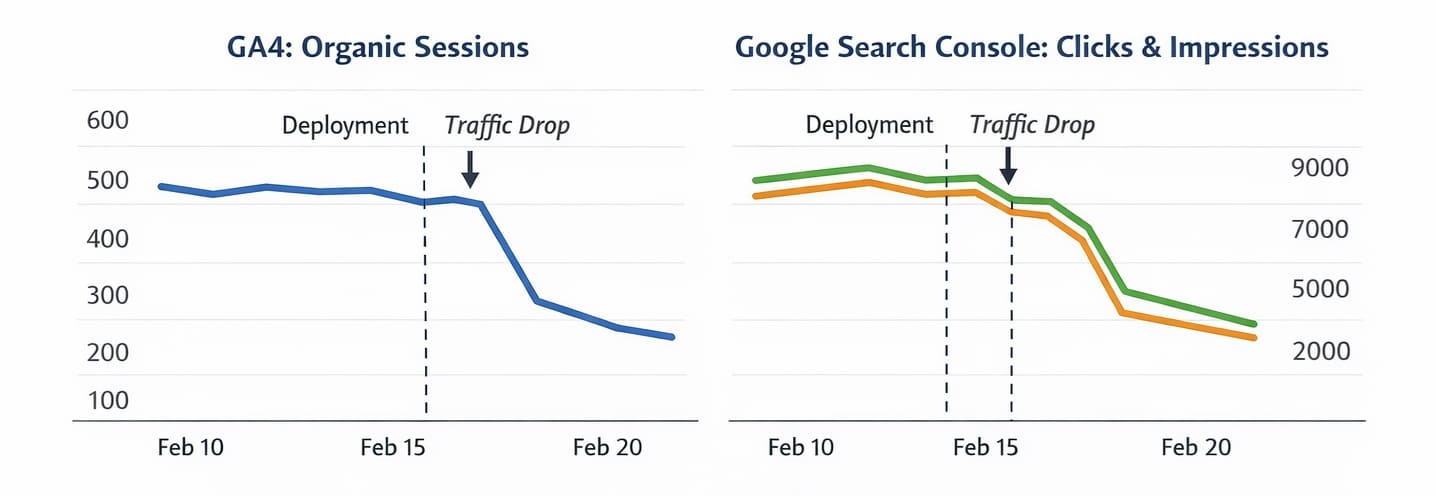
I always start by checking date ranges, annotations, tracking integrity, and channel isolation before I look at rankings. More than once, this has come down to something simple like a broken GA4 tag on blog templates rather than an SEO issue. A lot of “SEO traffic loss” turns out to be a bad comparison window, a tracking issue in GA4, or a channel mix problem where non-organic changes distort the story.
Use this first-pass checklist:
- Compare the affected period against a fair baseline, not just the previous few days.
- Review GA4 annotations, deployments, migrations, template edits, and tag changes around the drop date.
- Verify that tracking is still firing correctly on key templates and conversion paths.
- Check seasonality before calling it a decline, especially for publishers, SaaS blogs, and seasonal commercial pages.
- Isolate organic traffic from other channels so paid, direct, or referral noise does not mislead the diagnosis.
- Confirm whether the drop is sitewide, category-specific, country-specific, or limited to a few URLs.
What I tested in similar audits, especially on mid-size content sites during CMS changes and template rollouts, was a fast 30-minute sequence: first, validate data, then compare CTR versus position, then check indexation and crawl signals, then map update timing, and finally assess traffic quality. That order consistently reduced false alarms.
A practical example: if your homepage and blog both dropped on the same day, but only one country or one template was affected, you may be looking at tracking or technical segmentation rather than a domain-wide SEO collapse.
Separate CTR loss from ranking loss
If clicks dropped but rankings stayed relatively stable, the issue is often CTR loss rather than lost visibility. This is one of the most important forks in the whole checklist because the fix is completely different.
A study by Seer Interactive across 3,119 informational queries and 42 organizations, cited by Search Engine Land, found that organic CTR on AI Overview queries fell from 1.76% to 0.61%, a 61% drop since mid-2024.
At this point, most older SEO playbooks start to break. They assume traffic falls because rankings fell, but current research shows AI Overviews are reshaping click behavior even when positions hold.
That data point matters beyond just measuring the problem. The same research found that brands cited inside AI Overviews earned 35% more organic clicks and 91% more paid clicks compared to brands not cited. The right response to an AI Overview-driven traffic drop is not to hide from eligibility; it is to optimize for citation.
Here’s the practical diagnostic logic:
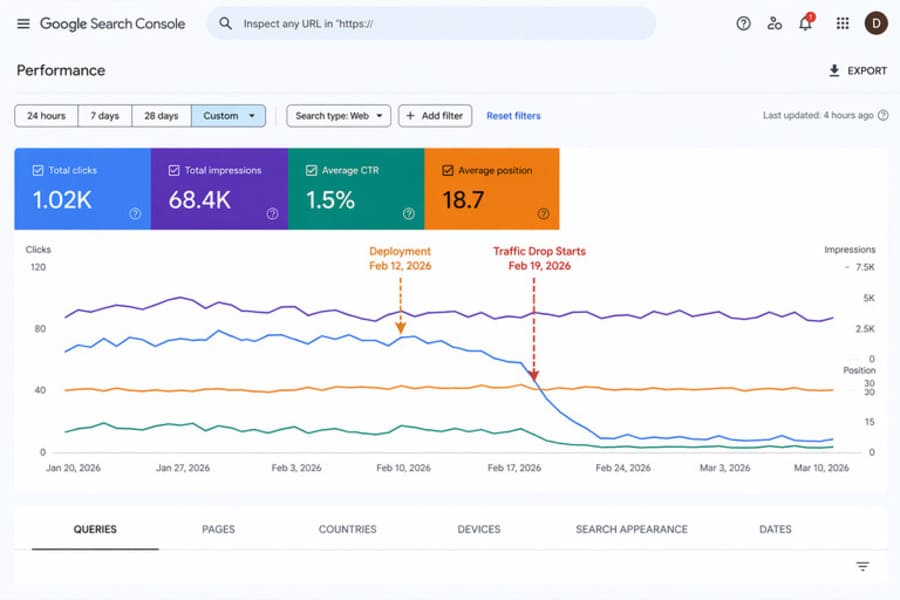
- If impressions are stable, average position is stable, and clicks dropped, check CTR before you touch content.
- If CTR fell most on informational queries, compare those pages against SERP features like AI Overviews, featured snippets, forums, and video blocks.
- If branded pages held steady but non-branded informational pages slipped in clicks, the loss may be query-format specific rather than sitewide.
- Sometimes the page is still ranking, but it just isn’t getting the click anymore, which usually points to a SERP presentation or CTR issue.
What stood out to me here is how often teams misread this pattern. They see fewer clicks in Google Search Console and assume they need to “improve rankings,” even though average position is flat and impressions are still healthy. In that case, rewriting the page around the same keyword may not solve anything.
This is also the right place to use Google Search Console directly. Use the Queries, Pages, CTR, and Average Position views together, because any one metric in isolation can create a false narrative. GSC is the primary diagnostic tool for this layer precisely because it separates click behavior from ranking position in ways that GA4 alone cannot.
Fix technical and indexation issues causing traffic drop
If impressions, clicks, and rankings all dropped together, a technical or indexation issue is the most likely cause. Usually, here, real visibility problems become obvious because multiple signals move in the same direction.
Instead of checking everything at once, start with high-impact failures like indexing blocks, crawl issues, and template-level changes. I have seen a small robots.txt change wipe out an entire blog section overnight, even while the rest of the site looked normal at first.
Use this technical pass:
- Inspect whether affected URLs are still indexable and still present in Google’s index.
- Review robots.txt, meta robots, canonicals, and template logic for accidental blocking signals.
- Check whether recent CMS, theme, JavaScript, or deployment changes altered crawlability or rendering.
- Compare affected sections for broken internal links, removed navigation paths, or pagination issues.
- Look for sudden spikes in redirects, 4xx/5xx errors, or soft-404 patterns on the pages that lost traffic.
- Confirm that important pages still match the intended canonical version and are not being consolidated incorrectly.
This is the point where many checklists get too broad. They list twenty technical possibilities without telling you what signal should trigger each check. Tie each review to a symptom: sitewide crash, section loss, page-type loss, or country/device-specific loss. That gives you a clear starting point rather than a random audit.
A quick example: if only blog pages dropped after a template update, but product and service pages remained steady, that points me toward blog template rendering, internal linking, structured content blocks, or accidental indexing directives on that section.
Google’s Search Status Dashboard is a useful first stop when you suspect a broader incident. It provides real-time status information on the systems that power Google Search, which helps you rule out platform-level crawling, indexing, or serving disruptions before escalating to an internal diagnosis.
When reviewing publishing workflow and template changes, our AI content review checklist is a practical companion for checking what might have changed at the content or configuration level before a page was published.
Map the drop against algorithm updates and intent shifts
If the decline aligns with ranking loss, broad volatility, or content quality patterns, algorithmic and intent-related factors move to the front. Here, you connect timing, page types, and query intent instead of defaulting to “Google changed something.”
A common pattern I see is teams jumping straight to blaming a core update because it feels like the obvious explanation. The more useful move is to look at three things together: the exact date of the decline, changes in average position and impressions in GSC, and whether the affected pages now mismatch current search intent or weaker E-E-A-T expectations.
If the drop date lines up with known Google search disruptions or broad update timing, that matters. Google’s Search Status Dashboard confirms issues with crawling, indexing, or serving, which helps you separate platform incidents from site-specific failures.
Search intent matters just as much as update timing. A page can keep some visibility and still lose clicks if the SERP now favors fresher formats, clearer answers, stronger first-hand experience, or more specific commercial alignment.
This is also where E-E-A-T becomes practical rather than theoretical. If the pages that dropped show patterns like missing author attribution, no original data or examples, or the same templated structure repeated across multiple URLs, they are more exposed during quality recalibration. Site-specific implementation will vary, but the diagnosis starts by identifying those patterns before changing the whole content set. See our guide on E-E-A-T for AI content.
Evaluate traffic quality, not just traffic volume
The final layer in this organic traffic drop checklist is business quality. Sometimes traffic falls because low-intent visits disappear, and that changes the graph without hurting what actually matters.
This is another part of the 2026 shift that most articles still miss. Rankings can recover while traffic and business outcomes do not, because the lost visits were never the right visits in the first place. That makes traffic quality vs. traffic volume one of the most important distinctions in a modern SEO audit.
Here’s what I look at before calling something a true loss:
- Did conversions, assisted conversions, or qualified leads drop with the traffic?
- Which landing pages lost visits, and were those pages driving useful actions before the decline?
- Did informational pages lose clicks while commercial pages stayed steady?
- Are you losing broad, low-intent queries while retaining intent-aligned visits that still convert?
- Did engagement and next-step behavior improve even though raw sessions declined?
But here’s where many teams get stuck: they track traffic as the main success metric, then rebuild pages to recover vanity sessions. In practice, the better question is whether the traffic you lost was worth recovering at all.
That framing changes the response. Instead of trying to “get traffic back,” you may need to protect high-intent pages, improve commercial clarity, strengthen comparison content, or make key pages more citable and more useful in AI-assisted search journeys.
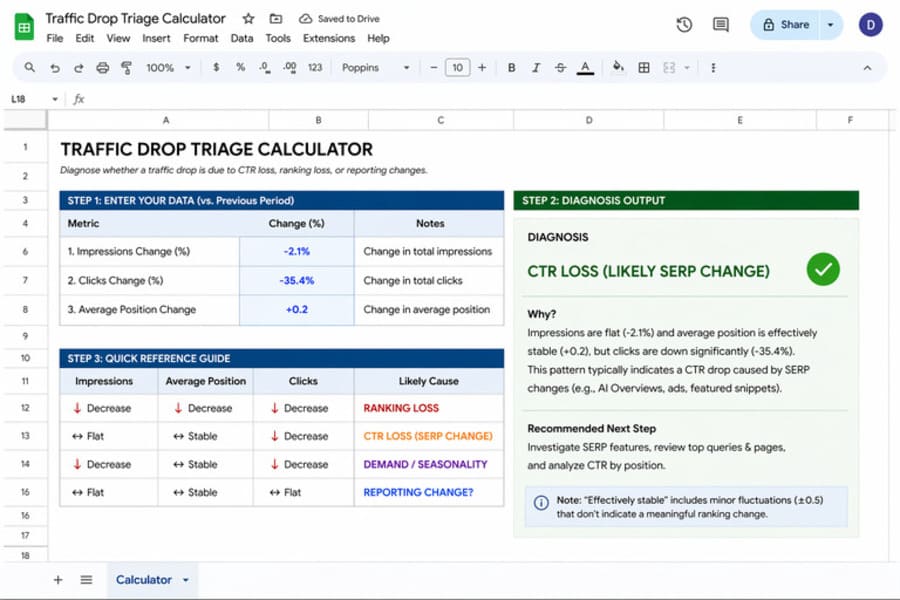
A useful next step here is a simple traffic drop triage calculator. If you plug in changes in impressions, clicks, and average position, it quickly indicates whether the pattern points to CTR loss, ranking loss, or reporting noise. Instead of manually interpreting multiple metrics, it gives a directional diagnosis based on how those signals move together.
Conclusion
Do not start fixing pages until you know whether the problem is measurement, visibility, click behavior, quality, or business intent. It sounds obvious, but it is still the step many teams skip when traffic drops suddenly. That single step prevents most unnecessary SEO changes.
A good organic traffic drop checklist follows a clear diagnosis order: confirm the drop is real, separate CTR loss from ranking loss, check technical and indexation issues, map timing against updates and intent shifts, and then decide whether the lost traffic actually mattered.
FAQs
What is the first thing to check when website traffic drops?
The first thing to check is whether the decline is real. Verify your tracking, compare the right date ranges, isolate organic traffic properly, and rule out measurement or seasonality issues before you diagnose SEO causes.
Why is my organic traffic dropping, but my rankings are the same?
If rankings are stable but traffic is falling, the most likely cause is lower CTR rather than lower visibility. AI Overviews and other SERP features can satisfy intent directly on the results page, which reduces clicks even when your page still holds position.
How do I check if a Google update caused my traffic drop?
Match the drop date against the Google Search Status Dashboard or known update timing, then compare pre-drop and post-drop performance in Google Search Console. If the average position dropped meaningfully across affected pages and queries, an algorithmic factor is more plausible.
How do I recover lost organic traffic?
Recovery depends on the root cause. If rankings fell, improve relevance, quality, and intent match. If CTR fell while rankings stayed stable, improve how the page earns clicks and visibility within modern SERPs, including AI Overview citation opportunities.
Can a drop in Google Search Console impressions be misleading?
Yes. Some impression changes reflect platform-level reporting shifts rather than actual visibility collapse, which is why clicks, CTR, and average position should always be reviewed together before you take action.
Still not sure which layer is actually causing your drop? I can run a manual diagnosis across your Search Console and analytics data and tell you exactly what’s going on, tracking, CTR, technical, or a real ranking loss, before you change anything.